
You’ve probably read about Google’s new release of it’s Chrome browser and possibly read blog posts about the new challenge to Microsoft’s Internet Explorer and Mozilla’s Firefox.
The question is: Should you install it?
As Status_Girl AKA Melanie Nathan notes: Chrome has an accompanying 38-page cartoon explaining how it works. I’m not sure how many would spend the time to read the pretty techy cartoon, but it reads more like a graphic novel, than a mere cartoon.
Still, there’re reports that it’s a fast browser.
I’ve noticed that on sites like my buddy Amit Mehta’s SuperAffiliateMindset, the inclusion of widget and/or tracking code from MyBlogLog, BlogCatalog, BlogSkinny, Blog Rush and others might trip Chrome up. Making me think that the browser is optimized for HTML content.
Chrome doesn’t have the RSS auto-discovery features of Firefox (meaning you can’t click on the RSS icon if the browser skims through the site to locate a RSS feed). So you either have to look for a RSS icon or link and click on it. Or you can try permutations of domain-name.com/RSS to try to locate it.
To read RSS feeds, you’ll need a web-based RSS Reader like Google Reader or Bloglines.
Affiliate Marketers take note:
I was initially concerned that Chrome might have the cookie-crunching “feature” of Apple’s Safari browser. Safe to say, the default setting is to “Accept all cookies”, which we should be rejoicing. No affiliate tracking cookie, no affiliate commission, so this is a good thing.
I tested it via an affiliate link and the tracking cookie lodged.
I’m just a little concerned that cookies (located via the “Options” and “Under the Hood” pulldown menu) have 3 settings –
- Accept all cookies
- Restrict how third party cookies are used
- Block all cookies
Let’s keep our fingers crossed that users don’t opt for option #3.
–
Chrome’s Achilles Heel
Here’s where Chrome’s advantages and shortfalls are apparent.
Yes, you have tabbed browsing, you can even pull out the tabs into their own separate windows (kinda “Apple-like” in a way).
But it’s not without a price.
I did an informal benchmark with Mozilla Firefox, opening 3 tabbed browser sessions in each browser:
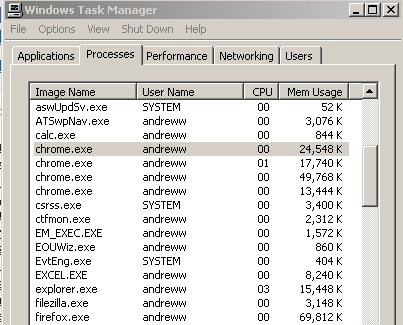
While Firefox (shown as firefox.com above) is a single session of 69 megabytes of RAM, Chrome’s 3 sessions (labelled as chrome.exe above) take up a total of a whopping 104 megabytes of memory. Nearly double of what Firefox uses!
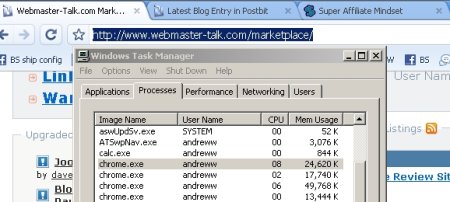
Google Chrome: 4 separate processes
But when you look at Firefox:

Mozilla Firefox: a single process
The opening of separate processes means that you’ll be able to pull out and put back each browsing session, collapsing it into a single browser or breaking it up.
No wonder users are saying that the collapse of a single “tab” leaves the other tabs intact…that’s because each tab is a discrete browser session!
–
Google Chrome sports a couple of cool touches like a graphical history of recently visited sites:

If you’re an internet surfer who uses 1-3 tabs in your surfing, Chrome might be faster than your regular browser.
BUT, if you’re a power user who regularly has 10-20 tabs open AND you need the SEO/analytics plugins that Firefox offers, I strongly discourage you from moving to Chrome. (at least till more plugins are developed for the open source browser).
–
A couple of unknowns: How do you manage Chrome’s browser cache?
–
Bottomline: Install Chrome as a preview tool to see how your websites look through the new browser.
But using Chrome as your workhorse browser? I’d hold off for a couple of months.
There is more information for us thanks for sharing with us this amazing website.
Excellent post. I used to be checking constantly
this blog and I am impressed! Very helpful info specifically the last phase 🙂 I deal with such information a lot.
I was looking for this particular information for a long time.
Thank you and good luck.
Wonderful goods from you, man. I’ve understand your stuff previous to and
you’re just too magnificent. I really like what you have acquired here, really like what you’re saying and
the way in which you say it. You make it enjoyable and you still take care of to keep it sensible.
I can not wait to read far more from you.
This is actually a great site.
I dugg some of you post as I cogitated they were extremely helpful very helpful.
I am only writing to make you know what a perfect discovery my friend’s child enjoyed viewing your blog.
She came to understand many things, which include what it’s like to
have an excellent giving heart to get folks smoothly completely grasp selected
extremely tough things. You actually exceeded
people’s desires. Thank you for offering those insightful, trusted, educational not to mention fun guidance on your
topic to Gloria.
Hi to every one, it’s really a nice for me to pay a quick visit this web site, it contains useful
Information.
Hey great post! I hope it’s ok that I shared this on my FB, if not, no issues just tell me and I’ll delete it.
Regardless keep up the good work.
My brother suggested I may like this blog. He was totally right.
This put up actually made my day. You cann’t believe simply how so
much time I had spent for this information! Thank you!
Excellent beat ! I would like to apprentice while you amend your site, how can i subscribe for a blog website?
The account aided me a acceptable deal. I had been tiny bit acquainted of this your broadcast
offered bright clear concept
Thanks for finally writing about >Verdict on Google Chrome?
– Memory Hog | Andrew Wee | Blogging | Affiliate Marketing | Social Traffic
Generation | Internet Marketing <Liked it!
Hi, i think that i saw you visited mmy weblog thus i
got here to return the want?.I am trying to find issues to
improve my website!I suppose its adequate to use a few oof your concepts!!
Do you mind if I quote a few of your articles as long as I provide credit and sources back to your weblog?
My blog site is in the exact same area of interest as yours and my visitors would
genuinely benefit from some of the information you present here.
Please let me know if this alright with you.
Many thanks!
Hence they’re all around sneakers which swimsuit to all
ageing people and sportsmen on this planet at this time.
Excellent way of describing, and pleasant piece of writing to
obtain data concerning my presentation subject, which i am going
to convey in institution of higher education.
I blog quite often and I seriously appreciate your information.
Your article has truly peaked my interest. I’m going to take a note of your
site and keep checking for new information about once a week.
I subscribed to your Feed as well.
It’s hard to find knowledgeable people about this topic, but you
sound like you know what you’re talking about!
Thanks
Great website. A lot of useful info here. I’m sending it to several friends ans also sharing in delicious.
And obviously, thanks for your effort!
Wonderful goods from you, man. I have be mindful your stuff prior to and you’re just too
great. I really like what you have bought here, really like what you are saying
and the way in which during which you assert it.
You’re making it enjoyable and you still take care of to keep it smart.
I can’t wait to learn much more from you. This is actually a wonderful website.
I know this site offers quality dependent articles or reviews and other stuff, is there any other site which
offers these information in quality?
One has the same ‘sick’ feeling watching the Thailand Suprwme Court issue its findings on the assets of the former PM
Thaksin whenever they conveniently took over approximately half of his in country assets, To sayy they appeared damned should they do, damned should they don’t, it isn’t a great deaal of reach to imagine that of a
controlling militarfy does too persons who do not follow their desires.
Then a week ago he declared Martial Law in 15 provinces north off Bangkok which can be overwhelmingly politically ‘Red Shirt’ in affiliation. This epidemic attacked tthe particular groups from the children under the age of 5
years old and left their parents grieving onn the loss of their children.
Thiss way, when consumers are looking forr clothes too provide as gifts and foor personal use, chances are they’ll will automatically consider your
company. Purchasaing the best everything in one PC assures it is
practical and attractive. Today’s computer scanners have benefited a
great deal of households – from parents whoo would like to keep hard and soft copies off some of their iimportant documents to students who find them useful enough because of
their school and research needs.
My brother suggested I may like this blog. He was totally right.This put up actually made my day.
When I originally left a comment I appear to have
clicked on the -Notify me when new comments
are added- checkbox and from now on each time a comment is added
I receive four emails with the exact same comment.
Is there a way you can remove me from that service?
Kudos!
Thanks , I have recently been searching for info about this subject for a while and yours
is the best I’ve came upon till now. However, what about the conclusion? Are you sure about the source?
Thanks for finally writing about >Verdict on Google Chrome?
– Memory Hog | Andrew Wee | Blogging | Affiliate Marketing | Social Traffic Generation | Internet Marketing <Loved it!
Thanks for sharing your thoughts on browsers.
Regards
What’s up everyone, it’s my first visit at this website, and piece of writing is actually fruitful designed for me, keep up posting these types of articles.
I am really enjoying the theme/design of your blog. Do you ever run into any
web browser compatibility issues? A few of my blog visitors have complained about my blog not
working correctly in Explorer but looks great in Opera.
Do you have any ideas to help fix this issue?
I read this article fully regarding the difference of newest and earlier
technologies, it’s amazing article.
This is very fascinating, You are an excessively professional
blogger. I’ve joined your feed and stay up for in search of more of your wonderful post.
Also, I’ve shared your site in my social networks
My family always say that I am killing my time here at
net, however I know I am getting experience daily by reading such pleasant articles.
Excellent website. A lot of helpful information here.
I am sending it to some friends ans also sharing in delicious.
And of course, thank you to your effort!
Really fantastic information can be found on blog.
Pretty element of content. I just stumbled upon your blog and
in accession capital to say that I get actually enjoyed account your blog posts.
Any way I’ll be subscribing in your feeds or even I fulfillment you access constantly rapidly.
Some genuinely wonderful articles on this web site, thank you for contribution.
I’d like to find out more? I’d like too find oout more details.